You’re revising, half-tired, and a headline pops up that feels too important to ignore. It’s shared by a friend, it looks like a “real” news site, and it claims something shocking. Do you tap it?
If you want to spot fake news sites before they waste your time (or worse, steal your data), domain tools are your quiet superpower. They’re like checking the label on food before you eat it, quick, boring, and often the difference between fine and regret.
Key Takeaways
- Read the domain carefully for typos, extra words, and odd endings.
- Use WHOIS and domain age tools to see when a site was created and who registered it.
- Treat “brand-new domain + big newsroom claims” as a major mismatch.
- HTTPS helps, but it’s not proof a site is trustworthy.
- Combine domain checks with basic source habits, like checking the author and looking for independent coverage.
Why domain checks work (even when the website looks convincing)
Fake news sites don’t usually fail because the design is messy. Many look polished, copy layouts from real outlets, and use names that sound familiar.
What’s harder to fake is a clean, consistent domain history. A domain is like a flat’s tenancy record. If a site claims it’s been “reporting since 2008”, but the domain was registered last month, something doesn’t add up.
Step 1: Read the domain like you’re checking a suspicious email address
Before you use any tools, pause and scan the URL itself. Most fake news traps rely on you reading too fast.
Look for these patterns:
- Lookalike spelling:
bbcc-news.coinstead ofbbc.co.uk - Extra words bolted on:
theguardian-politics.com - Weird endings: not always wrong, but a random combination can be a clue (especially if the site claims to be UK-based)
- Subdomain tricks:
bbc.co.uk.example.comis not the BBC, the real domain isexample.com
If you’re on a phone, press and hold links to preview the full URL before opening it. On a laptop, hover over the link first.
Step 2: Check domain age and registration details (the fastest credibility test)
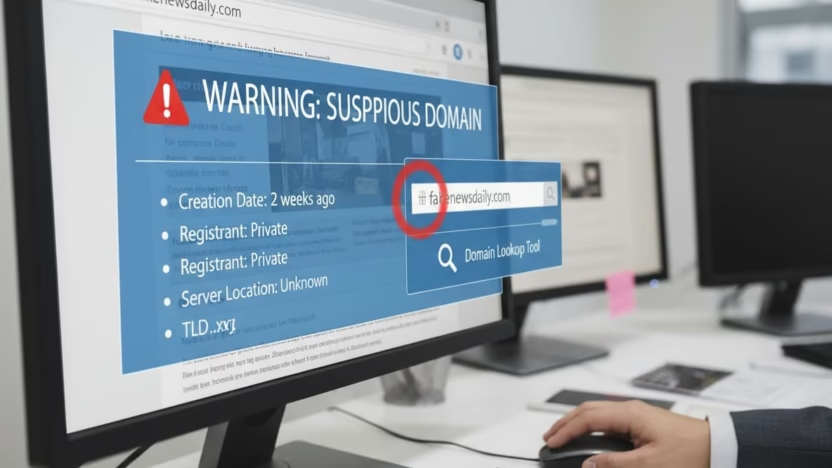
When you’re deciding whether to trust a “news” site, domain age is one of the quickest checks you can do. Many free tools show the creation date in seconds.
Two reliable starting points:
- ICANN Lookup (official registration data lookup)
- WhoisXML API’s free Domain Age Checker (quick domain age results)
Here’s what you’re looking for in the results:
| What you see in the domain data | What it can mean | What to do next |
|---|---|---|
| Domain created very recently | Could be a churn-and-burn fake news site | Be sceptical, search for independent reporting |
| “Privacy” or hidden registrant | Can be normal, can also hide bad actors | Don’t judge on this alone, check other signs |
| Lots of recent updates/changes | Sometimes harmless, sometimes suspicious | Look for consistent branding, authors, contact info |
A useful rule: age should match the story a site tells about itself. If the homepage says “Award-winning journalism for 15 years” but the domain is six weeks old, treat it like a knock-off trainer with perfect stitching.
For extra background on how WHOIS checks help spot dodgy sites, CircleID has a clear explainer on using WHOIS to avoid fraudulent lookalikes: https://circleid.com/posts/20200212_how_to_avoid_fraudulent_classifieds_sites_with_whois
Step 3: Use domain tools to spot “connected” fake networks
Some fake news sites aren’t one-off scams. They’re part of a bigger set of linked domains that push the same stories, ads, or clickbait.
If you’re seeing the same headline repeated across different sites, or lots of “news” pages that feel copy-pasted, it’s worth checking whether the domains share patterns.
Services like DomainTools publish examples of how investigators uncover groups of related counterfeit sites: https://www.domaintools.com/resources/blog/how-to-uncover-a-massive-campaign-of-counterfeit-related-websites/
You don’t need to be a cyber expert to use this idea. You’re just looking for repetition:
- Similar domain names registered around the same date
- Matching layouts, same “About” text, same contact email
- Stories that don’t appear anywhere else except that cluster
Step 4: Don’t let HTTPS fool you (it’s a seatbelt, not a character reference)
Many students assume the padlock icon means “safe and true”. It doesn’t. HTTPS mainly means your connection to the site is encrypted. Fake sites can use HTTPS too.
Think of it like a sealed envelope. It can stop someone reading what you send, but it doesn’t prove the sender is honest.
If a site has HTTPS but also shows these signs, slow down:
- No clear publisher details
- No real author pages (just “Admin”)
- A flood of ads and pop-ups
- Big claims with no sources
Step 5: Quick cross-checks that pair well with domain tools
Domain tools tell you about the wrapper. You still need a quick glance at the content inside.
A simple routine that works well for students:
1) Check the “About” and “Contact” pages
Real outlets usually state who runs the site, where they’re based, and how to contact them. Fake sites often use vague wording or nothing at all.
2) Search the claim, not the headline
Copy a key phrase or statistic into search and see if trusted outlets are also reporting it. If the story only exists on one site, that’s a warning sign.
3) Watch for weak reasoning
Fake news often uses emotional leaps instead of evidence. If you want a quick guide to common tricks, this helps: https://thestudyjournal.com/logical-fallacies-for-students-common-examples-and-how-to-call-them-out/
4) Use a calm fact-check process when the topic is political
Politics spreads fast in group chats and on TikTok, and it’s easy to feel pressure to react. A student-friendly approach is here: https://thestudyjournal.com/how-to-fact-check-political-claims-as-a-student-without-getting-overwhelmed/
A real-world example (60 seconds, no stress)
Imagine you see: “UK government approves new £2,000 monthly student grant” on a site you’ve never heard of.
You can do this in under a minute:
- Read the domain. Is it a weird lookalike, or stuffed with extra words?
- Put the domain into ICANN Lookup. Was it created last week?
- If it’s new, search: “£2,000 monthly student grant UK” and check if credible outlets mention it.
- If it’s nowhere else, assume it’s bait until proven otherwise.
That’s not cynicism. That’s basic self-defence for your attention.
Conclusion
Fake news sites rely on speed, emotion, and the hope that you won’t check the label. Domain tools slow things down just enough to bring your judgement back online. If the domain history and the site’s story don’t match, trust that mismatch. Your future self will thank you for choosing proof over panic.
Frequently Asked Questions About Spotting Fake News Sites Using Domain Tools
Can a brand-new domain ever be legitimate?
Yes. New student papers, local blogs, and new projects start all the time. The red flag is when a brand-new domain claims a long history, major awards, or “trusted worldwide” status with no evidence.
Does hidden WHOIS information mean a site is fake?
No. Many legitimate site owners use privacy protection to reduce spam and harassment. Treat it as one signal, then check the site’s transparency, authors, and whether other sources confirm the story.
What’s the quickest free domain tool to use?
For most people, ICANN Lookup plus a domain age tool like https://whois.whoisxmlapi.com/domain-age-checker is enough for a fast first check.
If a site has HTTPS, is it safe to open?
HTTPS helps protect your connection, but it doesn’t prove the site is honest or malware-free. Still be careful with downloads, pop-ups, and “sign in to read” prompts.
How many checks should I do before sharing something?
At minimum: read the domain, check domain age if it’s unfamiliar, and see if at least one reliable outlet also reports the same claim. If it’s a big claim, raise your standards before you repost it.