
 Torey
Torey
Open-book exams sound comforting, until the clock starts and your time management hinges on notes that behave like a junk drawer. You know the answer is “in there somewhere”, but you can’t land on the right page. Meanwhile, everyone else is writing.
A strong open-book exam strategy isn’t about bringing more paper. It’s about building a usable notes pack you can search in seconds, then training yourself to recall first and confirm second.
If you treat your notes like a satnav, you’ll stop circling the same roundabout.
Key Takeaways
- A good usable notes pack is built for speed, not completeness.
- Your first page should be a table of contents that reflects the key themes of the module.
- Tabs work best when they match the types of questions you’ll face.
- Retrieval practice beats highlighting because it trains recall under pressure.
- These reference materials must prioritize active learning over passive reading.
Build A Usable Notes Pack (So You Can Find Anything Fast)
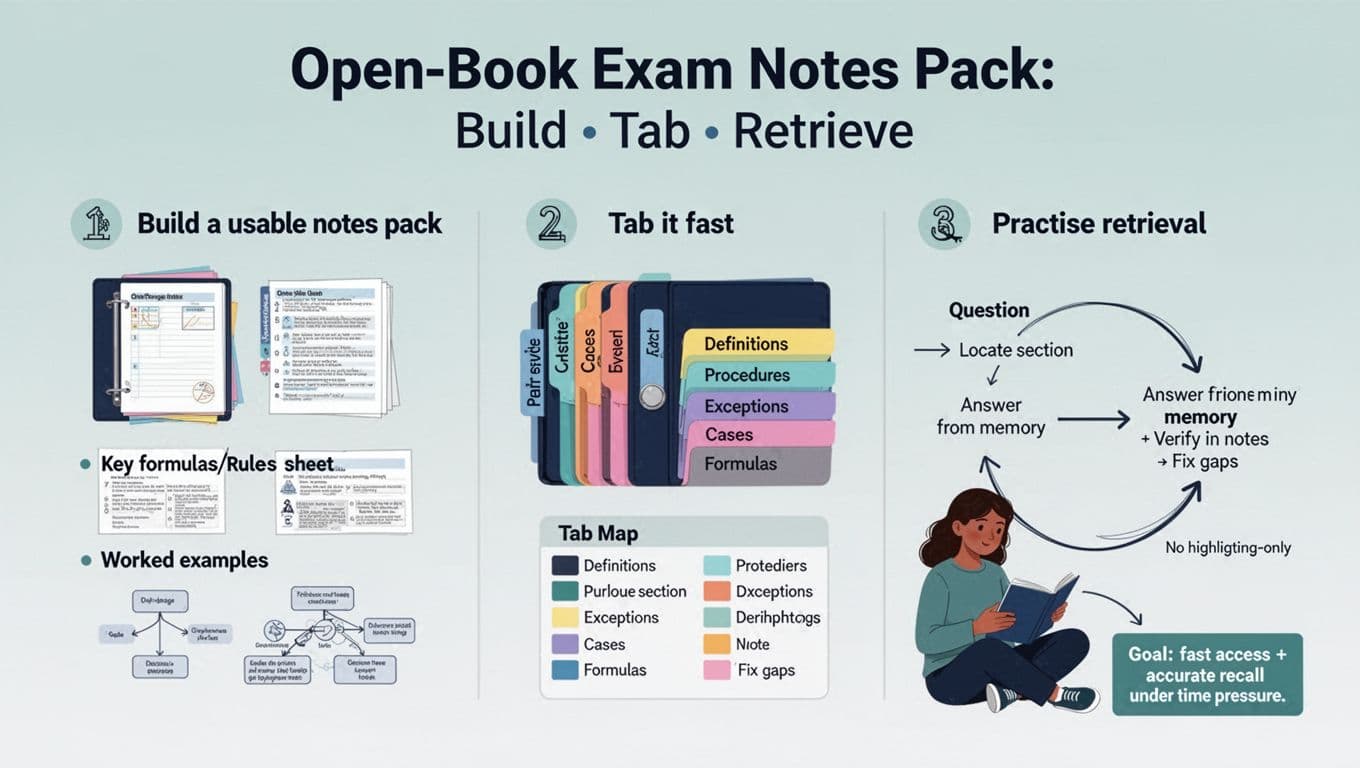
Start by accepting this: you won’t have time to “revise” during the exam. Even in a 24 to 48-hour format, time disappears in planning, writing, and checking references. Universities outline clear exam expectations that open-book assessments test the application of concepts and judgement, not simple recall or copying, for example in UCL’s guidance on preparing for open book assessments{:rel=”nofollow” target=”_blank”}.
So, build a pack that supports decisions.
Building Your Reference Materials: The Notes Pack Structure That Works In Real Exams
Aim for a slim binder (or one PDF) with four layers:
- Table of contents: your map. Use the same headings as your syllabus.
- Rules and definitions sheet: the “don’t mess this up” page.
- Worked examples: not ten, just the most common patterns.
- Decision trees: “If the question says X, check Y, then apply Z.”
If you’re starting from messy lecture notes, first summarize course content before getting them into a reliable structure. This pairs well with the approaches in essential note-taking methods for students, especially if you use Cornell-style cue prompts for quick scanning.
One helpful filter is brutal: if a page of course materials doesn’t help you answer a question, cut it.
Here’s a simple way to decide what earns a spot in your pack.
| Include In Your Pack | Skip Or Archive Elsewhere |
|---|---|
| Exam-style worked answers | Full textbook chapters |
| “Trigger” phrases and what they mean | Long quotes you’ll never paste in |
| A short case list with one-line uses | Unsorted lecture slides |
| Common formulae and units | Over-coloured highlighting |
| Study charts | Detailed derivations |
| Margin notes | Verbose explanations |
| Mistakes you keep making | Anything you can’t explain quickly |
Takeaway: your pack should feel like a toolkit, not a storage box.
If you can’t locate a page in 10 seconds at your desk, you won’t find it in an exam.
Tab It Fast With A System You Can Repeat

Tabs are only useful if you can trust them. Random colours and vague labels look nice, but they fail when you’re stressed. Instead, tab by function (what the question demands), not by week numbers.
A Practical Tab Plan For Most Subjects
Use 5 to 7 tabs, maximum. More tabs usually means more searching.
Good “function tabs” include:
- Definitions
- Procedures / Methods
- Exceptions / Edge Cases
- Examples
- Formulae / Data
- Checklist / Structure (essay plans, report headings, marking rubric cues)
Next, create a “Tab Map” on your inside cover. It’s just a tiny legend that says what each color-coded tab means. This removes thinking time.
If you’re using a PDF for your digital study notes, copy the same idea with bookmarks as a search strategy. Keep bookmark names short. Put the most-used sections at the top. Also, test your file on the same device you’ll use in the exam. A perfect pack is useless if it lags or won’t search properly.
To improve the quality of what you’re tabbing, tighten your source notes first. The advice in top strategies for better note-taking in class helps, especially around headings, abbreviations, and consistent structure. Organized course materials like this allow for better time management during the actual assessment.
Practise Retrieval (not highlighting) So Your Notes Become Backup
Highlighting feels productive because it’s low effort. Your brain stays on rails. In an exam, you need steering.
Retrieval practice trains you to pull answers out, then use notes as a safety net. It supports higher-order thinking, synthesis and analysis, and critical thinking skills. This is the heart of an open-book exam strategy that works under time pressure. It also aligns with professional exam advice, like ICAEW’s guide on how to prepare for open book exams{:rel=”nofollow” target=”_blank”}, which highlights methods that ensure academic integrity by focusing on original application.
The Five-Step Retrieval Loop (Do This Little And Often)
Use this loop in 10 to 20-minute bursts:
- Question: pick a question from practice exams or write one from a lecture objective.
- Locate: open the section you think holds the answer (use tabs, not scrolling).
- Answer From Memory: as a form of self-testing, write a short plan or paragraph without looking.
- Verify In Notes: check for missing steps, definitions, or exceptions.
- Fix Gaps: add a one-line correction to your pack (not a whole new page).
That last step matters most. Your pack should evolve based on mistakes, not on what looks “complete”.
Try a simple constraint: allow yourself to open notes only after 60 seconds. At first, you’ll feel stuck. After a week, you’ll start recalling faster because you’ve trained the route, not the scenery.
Notes serve as reference materials, not replacement memory. Retrieval turns them into a quick check, not a crutch.
During your pre-test review, if you’re unsure what open-book rules apply (especially around quoting and citations), check your module handbook. Some universities also publish practical reminders about time management and integrity, for example the University of Edinburgh’s PDF on supporting you through open-book exams{:rel=”nofollow” target=”_blank”}.
Conclusion
Open-book exams reward students who can think, not students who can carry. Build a lean notes pack, tab it with purpose, and train retrieval until it feels normal. This open-book exam strategy aids time management so when the exam starts, you’ll spend less time searching and more time focusing on the key themes of your course rather than hunting for data.
Frequently Asked Questions About Open-Book Exam Strategy
Do I Need To Read Everything If It’s Open-Book?
No. Treat your notes pack as reference materials rather than a replacement for understanding. Focus on the parts you’ll apply. Use your notes pack to cover rules, steps, and examples, then practise using them on questions.
How Many Tabs Should I Use?
Usually 5 to 7. Use sticky notes as a tool for categorization. Fewer tabs means faster choices. If you keep adding tabs, your categories are too detailed.
Should I Handwrite Or Type My Notes Pack?
Choose the format you can search fastest during the exam. Consider a textbook index as a secondary search strategy. For many students, a printed binder works best in hall-based exams, while bookmarks help in online exams.
What’s The Best Way To Practise Without Past Papers?
Create concept maps or use command terms to turn lecture outcomes into questions. Also, rewrite seminar prompts as exam questions, then run the retrieval loop and fix gaps in your pack.